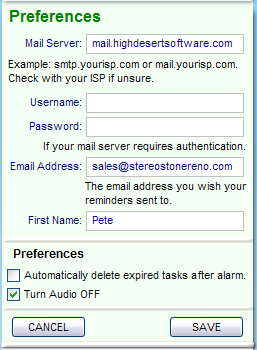
To use the email function in Speedo Shopper, you must
configure the email server used to send the mail. Clicking "Setup" in the upper
left corner of the main screen will slide down the Preferences
window.
Mail Server: This will be something
like mail.yourisp.com, or smtp.yourisp.com. This is the same info you use to
send mail in your email client, such as Outlook Express.
Username: The username you use to
log in to your email account. Same as you email
client.
Password: The password you use to log in to your
email account. Same as you email client.
Email Address: This will be the default email address
you wish to send reminders to. This can be changed when you check the send
reminder boxes in the ToDo Manager.
If unsure about any of the above, contact your
Internet Service Provider.
First Name: (Optional) Used to personalize emails
sent.
System
Preferences
Check the boxes to any that you want to
apply.
 Speedo Shopper