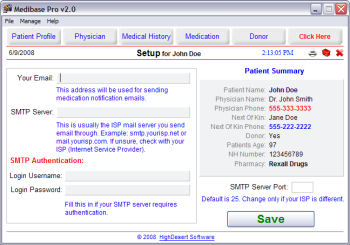
This is where you change your
program configuration settings.
If you wish to use the email function, you will need
to enter your email address and your SMTP server address. This will be something
like smtp.yourisp.com or mail.yourisp.com. If unsure about this, contact your
Internet Service Provider to get that info.
Most mail servers nowadays require authentication to
send mail to prevent spam relaying. This is normally the same username and
password you use to check mail in your email software. Enter this info in the
SMTP Authentication section.
Some ISP's also
use a different server port than the default port 25. If this is the case, enter
the port number in "SMTP Server Port". Leaving this blank will default to port
25.
When finished, click the "Save" button to exit this
screen.
This feature can be accessed by clicking the  icon in the upper right corner
of the screen.
icon in the upper right corner
of the screen.
 +MediBase Pro